
Using LaTeX
Every maths block is LaTeX underneath. The editor turns what you type into LaTeX as you go, and the engine reads that LaTeX to compute. Most people never see it. If you already think in LaTeX, you can work with it directly: type commands, edit a block’s source, paste equations in and copy them out.
One thing to hold on to: the editor can display far more LaTeX than the engine can compute. The second half of this page is where the two part company.
Everything here works on every plan.
Type a command
Section titled “Type a command”Press \ in a maths block and the field switches to LaTeX entry: what you type shows as source, with matching commands listed below it.
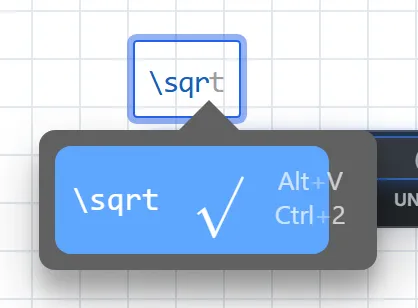
Press Space or Esc to finish. The command is typeset in place, ready for its contents: \sigma, Space, then _d gives . A whole construct works too: type \frac{1}{2} and press Esc for .
Don’t finish with Enter. It accepts the highlighted suggestion when the list is showing, but at other times it also finishes the block and opens a new one below, as Enter does everywhere in a maths block.
For everyday symbols you rarely need the backslash, because the editor converts familiar spellings as you type:
| Type | You get |
|---|---|
alpha, theta, Delta, … |
, , , … |
pi |
|
x/2 |
|
* |
|
<=, >=, != |
, , |
-> |
Function names stay as typed: sqrt is the function sqrt, not a root sign. A few of the editor’s own shortcuts are switched off, such as th, lim and int, which would otherwise turn the middle of pythagoras, limit or interp into an operator. MathLive’s keyboard shortcuts page lists the rest.
Edit a block’s source
Section titled “Edit a block’s source”Select part or all of a block and press Esc. The selection opens as LaTeX source, ready to edit:
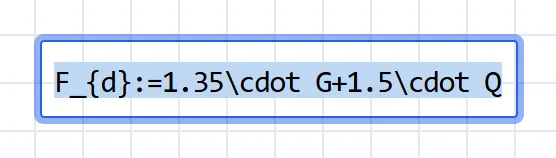
Shift + Home from the end of a block selects all of it. Ctrl + A won’t: it selects every block on the sheet, even from inside a maths block.
Press Esc to put the edited source back. The result stays selected and the field is still taking LaTeX, so press Esc once more, or an arrow key, before you type on. Clicking away keeps the edit too.
It’s the quickest fix for anything the editor makes awkward: a subscript that swallowed the operator after it, a bracket grouped the wrong way, a unit spelling (see Units).
Paste LaTeX into a block
Section titled “Paste LaTeX into a block”With the caret in a maths block, paste LaTeX and it arrives as maths. Delimiters are stripped first, so $…$, $$…$$, \(…\) and \[…\] all paste cleanly.
The LaTeX comes in exactly as written. Nothing translates it into the spellings the engine understands, so a \dfrac from a paper stays a \dfrac and fails (see What doesn’t compute).
Paste a document onto the page
Section titled “Paste a document onto the page”Paste onto an empty spot of the page instead, with nothing being edited, and the text is split into blocks for you, in reading order:
$$…$$or\[…\]makes a maths block, wherever it sits, even mid-sentence or across lines.- A line that is entirely
$…$or\(…\)makes a maths block. - A line of bare LaTeX makes a maths block: it needs a maths command or a braced subscript such as
a_{1}, no unknown commands (so a Windows path stays prose) and no two words in a row. - Everything else is prose. Consecutive lines, paragraphs included, share one text block, and
$…$inside a sentence stays there for the text block to typeset.
So this:
Bending check
The design moment and the elastic modulus of the section:$$M_{Ed}:=45\operatorname{kN}\cdot\operatorname{m}$$\[W_{el}:=1.2\cdot10^{6}\operatorname{mm}^3\]The stress is $\sigma = M_{Ed}/W_{el}$, which must stay below $f_y$.\sigma:=\frac{M_{Ed}}{W_{el}}
pastes as five blocks:
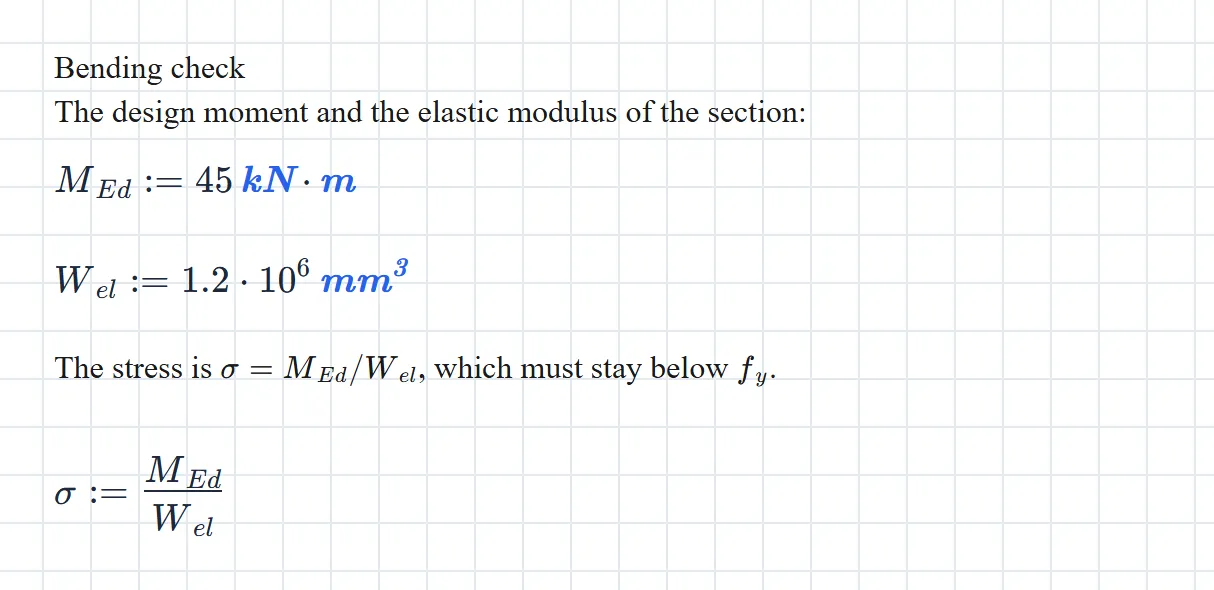
The whole paste is one undo step. A derivation from a paper, or an answer from a chatbot, becomes a paste and a tidy-up. Check what came in, though: a pasted = defines, exactly like a typed one, so an equation the source meant as a statement becomes a definition of whatever is on its left.
Copy LaTeX out
Section titled “Copy LaTeX out”With the caret in a maths block, Ctrl + C copies LaTeX: the selection if you’ve made one, the whole block if not. It comes wrapped in display delimiters, ready for a LaTeX document, Markdown, or a paste back onto a page:
$$ F_{d}:=1.35\cdot G+1.5\cdot Q $$Copying a selected block, rather than the maths inside it, is different. That copies the block itself, which pastes into any calcsheet but isn’t LaTeX anywhere else.
How the engine reads LaTeX
Section titled “How the engine reads LaTeX”The editor can display over 800 LaTeX commands. The engine computes a subset, and a command outside it is almost always an error rather than something skipped.
What computes
Section titled “What computes”| LaTeX | Means |
|---|---|
:= or = |
A definition. A single = defines; it never tests. |
==, \ne or \neq, <, >, \le or \leq, \ge or \geq |
A comparison. See Assertions. |
+, -, \cdot, \times, \div |
Arithmetic. Between two vectors, \times is the dot product, the same as \cdot; use cross(u, v) for the cross product. |
\frac{a}{b} (or \dfrac, \tfrac, \cfrac), a^{b}, \sqrt{x}, \sqrt[n]{x}, n!, 50\% |
Fraction, power, roots, factorial, percent. |
a \bmod b |
The remainder, the same as \operatorname{mod}\left(a, b\right). |
\left( … \right) or ( … ) |
Grouping. |
\left| x \right| |
Absolute value; the length of a vector, or the determinant of a square matrix. |
\lfloor x \rfloor, \lceil x \rceil |
Floor and ceiling. |
\sin, \cos, \tan, \cot, \sec, \csc, \arcsin, \arccos, \arctan, \sinh, \cosh, \tanh |
Trigonometry, in radians unless the angle carries a unit. |
\ln, \log, \log_{b}, \exp, e^{x} |
Natural log, base-10 log, base- log, exponential. |
\max, \min, \det |
The functions of those names. |
\operatorname{mod}\left(7, 3\right) |
Any built-in or user function, by name. |
\pi, e |
The constants. |
\infty |
Infinity, shown as ∞: is . An integral’s limits must still be finite. |
\text{M12} |
Text, for labels and table keys. |
\begin{pmatrix} … \end{pmatrix}, also bmatrix, Bmatrix, matrix |
A matrix. A single column is a vector. |
\begin{vmatrix} … \end{vmatrix} |
The determinant of that matrix. |
M^{\top}, M^{\mathrm{T}}, M^{\intercal} |
Transpose. |
v\left[2\right] or v[2], M\left[1,2\right] |
An element, counting from 1. |
\land or \wedge, \lor or \vee, \lnot or \neg |
And, or, not, in conditions. |
\to or \rightarrow |
The symbolic arrow. See Symbolic maths. |
\int_{a}^{b} f\,dx |
A definite integral, worked out numerically; nested for a double or triple integral. See Integrals. |
\int f\,dx |
Without limits, the antiderivative as a formula. See Integrals. |
1.5\cdot10^{-3}, 1.5e-3 |
Scientific notation. |
Spacing commands (\,, \;, \quad) are for looks. Between digits they vanish, so 1\,000 is a thousand.
- A run of letters is one name.
abis the name ab, not times , and since LaTeX ignores spaces in source, so isa b. Writea \cdot b. A thin space (\,or\;) between two letters also reads as a product, but\quaddoesn’t and\:isn’t understood, so\cdotis the safe choice. - A subscript is part of the name.
F_{y}andF_yare the same name. Inside a subscript use plain letters or\mathrm, never\text:T_{\mathrm{max}}works,T_{\text{max}}fails with an Unexpected operator message. - A Greek letter joins the letters after it, space or no space:
\Delta Tis the one name . Put\cdotafter a Greek letter you mean to multiply.\phiand\varphiare the same name;\epsilonand\varepsilonare two. - An accent is part of the name.
\hat{x},\bar{x}(or\overline{x}),\vec{F}and\tilde{x}are names in their own right. Avoid\dot{x}and\ddot{x}: a definition\dot{x} := 3is accepted, but no block can read it back. - So is a style.
\mathbf{F}is a different name fromF. Pick one spelling and keep to it.
\operatorname{kN}is what the editor writes when you type a unit after a number (you’ll also see it as\operatorname{\mathrm{kN}}, which reads the same). It means the unit unless the sheet defines a variable of that name, in which case it means the variable.\mathrm{kN}always means the unit, whatever the sheet defines. It’s the spelling the block menu’s Treat … as Unit writes.- Degrees are
30\degree, which is what the toolbar’s ° button writes. The usual LaTeX30^{\circ}doesn’t compute. - siunitx’s
\SI{…}{…}and\qty{…}{…}aren’t understood. Write the number, then the unit.
Conditionals
Section titled “Conditionals”The inline form is \operatorname{if}\left(c, a, b\right). The multi-line form is a left-aligned array, which is also how calcsheet files store it:
\begin{array}{l}\text{if }n>9\\\quad 1\\\text{else if }n>4\\\quad 2\\\text{else}\\\quad 3\end{array}\begin{cases} doesn’t compute; this array is its replacement.
What doesn’t compute
Section titled “What doesn’t compute”| LaTeX | Write instead |
|---|---|
\approx, \equiv |
==, for a check |
\pm |
Two blocks, one for each sign |
\binom{n}{k} |
\frac{n!}{k!\left(n-k\right)!} |
\sum, \prod |
\operatorname{sum} or \operatorname{prod} of a vector |
\frac{d}{dx} |
The derivative function |
\lim |
Nothing: there are no limits |
\begin{cases} |
The multi-line if above |
aligned, align, gather |
One equation per block |
\color, \textcolor, \boxed |
Nothing: styling doesn’t compute |
\newcommand |
Nothing: there are no macros |
30^{\circ} |
30\degree |
\SI{…}{…}, \qty{…}{…} |
The number, then the unit |
T_{\text{max}} |
T_{\mathrm{max}} |
\dot{x}, \ddot{x}, x' |
Another name, such as v_{x} |
The messages these produce describe the engine’s reading, not your LaTeX: Bad escape character \e for an aligned block, Value expected for a \color, or Undefined function followed by an internal name such as Sum, Approx or Binomial. When a pasted block shows one of those, look for a command from this table.
Edit the file
Section titled “Edit the file”A .mez file is a zip archive. Inside, worksheet.yaml holds the sheet, and each maths block’s LaTeX is its value:
- id: "42d8fa98-b75f-44fe-b90d-9de543200425" type: "math" layout: page: 1 x: 60 y: 865 width: 300 height: 50 value: "V_{c}\\left(R,h\\right):=\\pi\\cdot\\left(R^2-\\frac{h^2}{4}\\right)\\cdot h"The value is a double-quoted YAML string, so every backslash is doubled. That makes the file the place for sheet-wide surgery: a search and replace in a text editor fixes forty pasted \dfracs in one go.
To edit one:
- Work on a copy. Rename it from
.mezto.zipand extract it. - Edit
worksheet.yaml. - Zip it back up with
worksheet.yamlat the top of the archive, beside thediagramsandimagesfolders, not inside a folder of its own. - Rename it to
.mezand open it from Home with Open from local drive.
Open from local drive also takes worksheet.yaml on its own. The maths and text come through; diagrams and images don’t, because they live in the archive beside it.
LaTeX in text blocks
Section titled “LaTeX in text blocks”Text blocks typeset LaTeX between dollar signs, so $\sigma_d$ in a sentence gives . That maths is for reading only; nothing in a text block computes. The rules for when a dollar sign starts maths are in Text blocks.
Further reading
Section titled “Further reading”- LaTeX Commands (MathLive): every command the maths editor can display. Display, not compute; check a command against this page before relying on it.
- Keyboard Shortcuts (MathLive): the editor’s keys and typed shortcuts, a few of which Maths Explore switches off.
- Mathematical expressions (Overleaf): a short introduction to writing maths in LaTeX.
- List of Greek letters and math symbols (Overleaf): find a symbol by sight.
- Detexify: draw a symbol, get its command.
- LaTeX/Mathematics (Wikibooks): the thorough reference, environments and all.
- Pandoc’s
tex_math_dollars: the convention text blocks follow for when a dollar sign starts maths.
See also
Section titled “See also”- Text blocks for prose and inline maths.
- Matrices for vectors, elements and transpose.
- Symbolic maths for the arrow and
derivative. - Assertions for comparisons.
- Keyboard shortcuts for every key in a maths block.