
Beams
32 standard beam cases: simple spans, cantilevers, propped cantilevers, overhangs, fixed ends and two-span continuous beams. Pick one and it lands on the calcsheet as a schematic plus live functions for its reactions, shears, moments and deflections.
Free on every plan; needs an account.
Find a case
Section titled “Find a case”Click the beam icon in the activity bar.
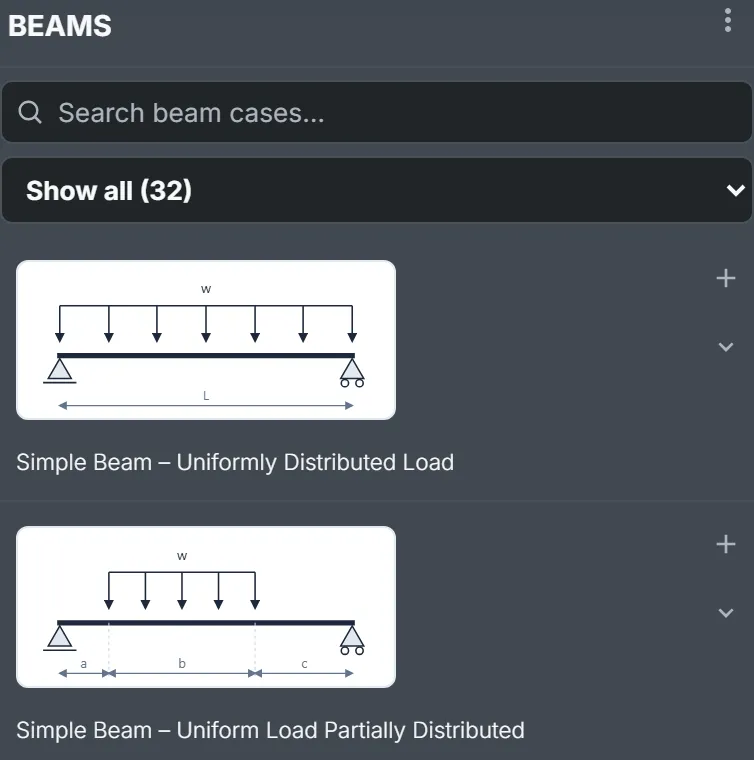
Two filters, stacked:
- Category (Show all (32)): Simple Beams, Cantilever Beams, Propped Cantilevers, Overhanging Beams, Fixed-End Beams or Continuous Beams.
- Search: the letters you type, in order, against name and summary; best match first. It ranks more than it filters –
udlkeeps 29 of the 32 but leads with the fully loaded spans, andcant pointputs Cantilever Beam – Concentrated Load at Any Point on top.
Insert a case
Section titled “Insert a case”Click the page to place the beacon, then press +. With no beacon it goes below everything.
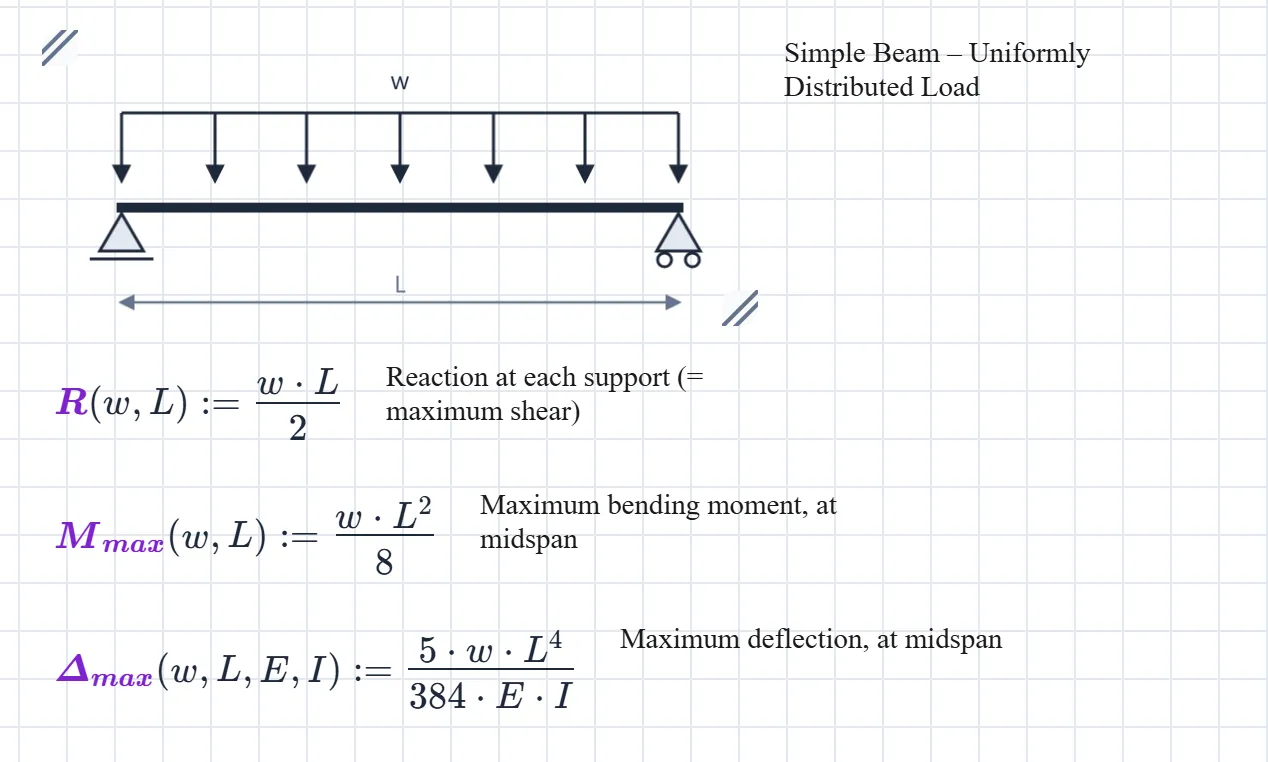
You get:
- The schematic, as a diagram block, with the case name beside it.
- One function definition per formula, with a line saying what it gives and where.
It arrives selected, so it drags as one. One Undo removes it. The definitions show no result; they wait to be called.
Choose what comes in
Section titled “Choose what comes in”The chevron under + opens the case’s contents, all ticked.
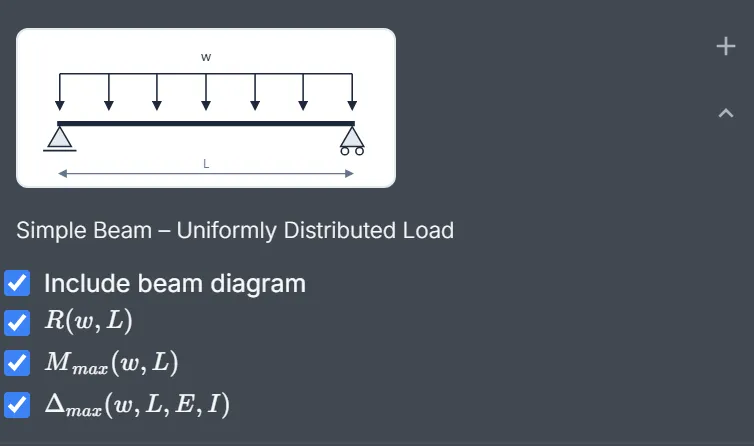
- Include beam diagram: untick it and the name comes in as a small unnumbered heading instead.
- One box per formula: hover over one for its description; untick what you don’t need.
Don’t untick a formula the others call. , the total length, is the usual one: in Simple Beam – Concentrated Load at Any Point, , , and all divide by . Leave it out and they fail with Undefined function L_1. The panel won’t stop you.
Use the formulas
Section titled “Use the formulas”Define the inputs, then call:
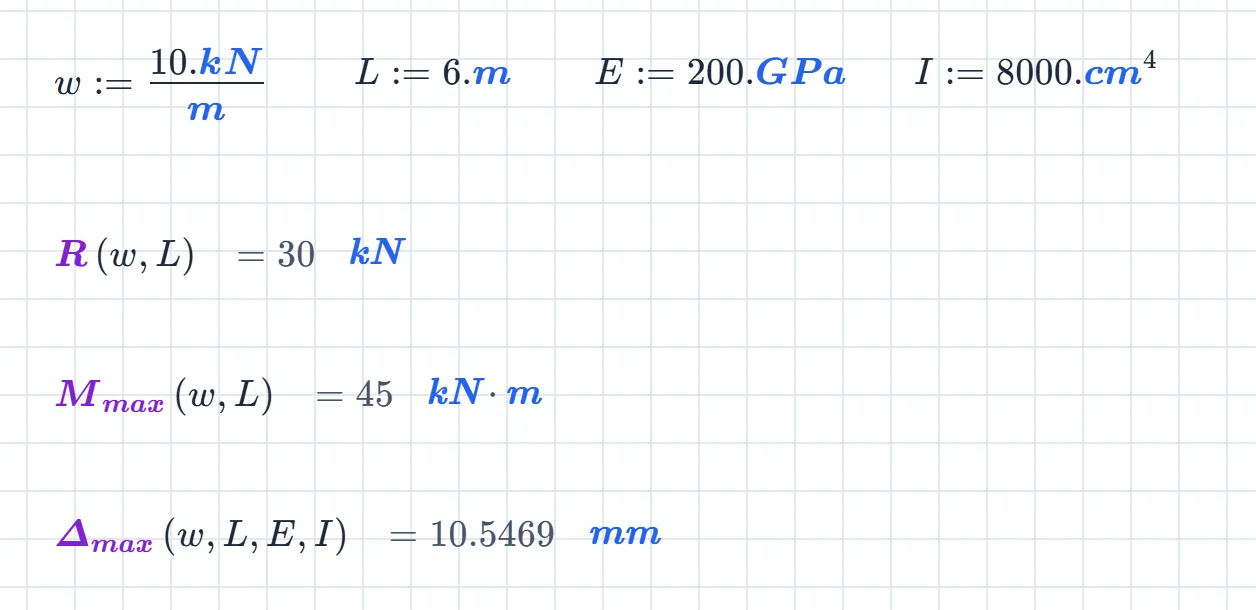
That’s Simple Beam – Uniformly Distributed Load with , , and :
Change and all three move.
Arguments go by position. The first in the brackets is the load, whatever it’s called: M_max(w_d, L_s) works, and so does M_max(10.kN/m, 6.m). While you type, a hint names the argument under the caret and gives a typical value:
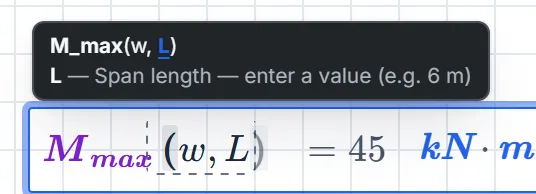
For all of a formula’s notes at once, right-click its description and choose Detailed Description.
Units look after themselves. The result carries its unit; change it in the unit box, as in Your first calcsheet.
Assign a result to carry it forward. gives .
(Mind : it’s also the litre. Define and every litre below becomes six metres. Only matters if the sheet measures volumes; call the span there.)
The catalogue
Section titled “The catalogue”Inputs: a uniform load per unit length, a total load, a point load, a span, , and distances along the beam (the schematic shows from where), the modulus of elasticity, the second moment of area. Subscripts number the first and second of a kind. Inputs says what a case needs, not the order; the hint gives the order.
Simple Beams
Section titled “Simple Beams”| Case | Gives | Inputs |
|---|---|---|
| Simple Beam – Uniformly Distributed Load | , , | |
| Simple Beam – Uniform Load Partially Distributed | , , , | |
| Simple Beam – Uniform Load Partially Distributed at One End | , , , | |
| Simple Beam – Uniform Load Partially Distributed at Each End | , , , , | |
| Simple Beam – Load Increasing Uniformly to One End | , , , , | |
| Simple Beam – Load Increasing Uniformly to Centre | , , | |
| Simple Beam – Concentrated Load at Centre | , , | |
| Simple Beam – Concentrated Load at Any Point | , , , , | |
| Simple Beam – Two Equal Concentrated Loads Symmetrically Placed | , , | |
| Simple Beam – Two Equal Concentrated Loads Unsymmetrically Placed | , , , | |
| Simple Beam – Two Unequal Concentrated Loads Unsymmetrically Placed | , , , |
Cantilever Beams
Section titled “Cantilever Beams”| Case | Gives | Inputs |
|---|---|---|
| Cantilever Beam – Uniformly Distributed Load | , , | |
| Cantilever Beam – Concentrated Load at Free End | , , | |
| Cantilever Beam – Concentrated Load at Any Point | , , |
Propped Cantilevers
Section titled “Propped Cantilevers”| Case | Gives | Inputs |
|---|---|---|
| Beam Fixed at One End, Supported at Other – Uniformly Distributed Load | , , , , | |
| Beam Fixed at One End, Supported at Other – Concentrated Load at Centre | , , , , , | |
| Beam Fixed at One End, Supported at Other – Concentrated Load at Any Point | , , , , |
Overhanging Beams
Section titled “Overhanging Beams”| Case | Gives | Inputs |
|---|---|---|
| Beam Overhanging One Support – Uniformly Distributed Load | , , , , , | |
| Beam Overhanging One Support – Uniformly Distributed Load on Overhang | , , , , | |
| Beam Overhanging One Support – Concentrated Load at End of Overhang | , , , , , | |
| Beam Overhanging One Support – Concentrated Load at Any Point Between Supports | , , , | |
| Beam Overhanging Both Supports – Unequal Overhangs – Uniformly Distributed Load | , , , , , , , |
Fixed-End Beams
Section titled “Fixed-End Beams”| Case | Gives | Inputs |
|---|---|---|
| Beam Fixed at Both Ends – Uniformly Distributed Load | , , , | |
| Beam Fixed at Both Ends – Concentrated Load at Centre | , , | |
| Beam Fixed at Both Ends – Concentrated Load at Any Point | , , , , , , , |
Continuous Beams
Section titled “Continuous Beams”| Case | Gives | Inputs |
|---|---|---|
| Continuous Beam – Two Equal Spans – Uniform Load on One Span | , , , , , , | |
| Continuous Beam – Two Equal Spans – Concentrated Load at Centre of One Span | , , , , , | |
| Continuous Beam – Two Equal Spans – Concentrated Load at Any Point | , , , , , | |
| Continuous Beam – Two Equal Spans – Uniformly Distributed Load | , , , , , | |
| Continuous Beam – Two Equal Spans – Two Equal Concentrated Loads Symmetrically Placed | , , , , | |
| Continuous Beam – Two Unequal Spans – Uniformly Distributed Load | , , , , , , , | |
| Continuous Beam – Two Unequal Spans – Concentrated Load on Each Span Symmetrically Placed | , , , , , , , |